How to Add Bible Verse Widget to iPhone Lock Screen: Complete Setup Guide 2026
Step-by-step guide on how to add Bible verse widget to iPhone lock screen using Bible Widget Verse of the Day. Get daily scripture inspiration right on your lock screen in 2026.
In a fast-paced world, keeping God's Word close is easier than ever. Adding a Bible verse widget to your iPhone lock screen lets you see inspiring scripture every time you glance at your phone – no unlocking required.
This 2026 guide shows exactly how to add Bible verse widget to iPhone lock screen using the free Bible Widget Verse of the Day app (from https://biblewidget.netlify.app). Perfect for daily devotionals, faith reminders, and spiritual growth.
Quick Answer
To add Bible verse widget to iPhone lock screen:
- Download Bible Widget Verse of the Day from the App Store.
- Long press your lock screen → tap Customize.
- Tap the widget area below the clock → add Bible Widget.
- Open the app to pick KJV translation, categories, and themes.
It auto-updates daily with fresh Verse of the Day.
Fast Setup Summary
- Install the app from App Store.
- Long press lock screen and tap Customize.
- Add Bible Widget to the slot below the clock.
- Customize translation, themes, and notifications in the app.
Why Add a Bible Verse Widget to Your Lock Screen?
- Instant daily inspiration with Verse of the Day
- No app opening needed – scripture at a glance
- Builds faith habit during busy days
- Beautiful designs (Nature Harmony, Sunset Glow themes)
- Unique extras: Heaven Mode + Bible Clock
The simple glanceable layout is designed for quick daily reflection.
Complete Step-by-Step Guide: How to Add Bible Verse Widget to iPhone Lock Screen
Prerequisites
- iPhone on iOS 17 or newer (Apple introduced Lock Screen widgets in iOS 16)
- Bible Widget Verse of the Day installed (free)
Step 1: Install the App
- Open App Store
- Search “Bible Widget Verse of the Day”
- Download and open once (loads first Verse of the Day)
Step 2: Enter Lock Screen Customization
- Wake your iPhone to show the lock screen
- Touch and hold anywhere on the lock screen
- Tap Customize at the bottom
Step 3: Add the Bible Widget
- Tap Add Widgets or the widget placeholder area (usually below clock)
- Search for “Bible Widget”
- Choose size: small rectangle fits perfectly on lock screen
- Tap to add → position if needed
- Tap Done → set as your lock screen
Your Bible verse is now live and changes daily!
Add the Widget to Your iPhone Home Screen
The same app can also place a verse on the Home Screen:
- Touch and hold an empty area on the Home Screen until the apps jiggle.
- Tap the Add (+) button and search for Bible Widget.
- Choose a widget size, tap Add Widget, then place it where you want it.
- Tap Done, then open the app if you want to change the translation or theme.
Step 4: Personalize in the App
- Open Bible Widget Verse of the Day
- Select translation: KJV recommended
- Pick categories: faith, hope, strength, love
- Enable features: Heaven Mode, Bible Clock, reminders
- Choose themes for stunning visuals
Bible Widget Verse of the Day Highlights
- Verse of the Day – fresh scripture every morning
- Heaven Mode – immersive book-style reading + relaxing worship music
- Bible Clock – verse synced to current time
- Daily Tasks & Prayer Reminders – build consistent faith habits
- Easy Sharing – spread inspiration on social
- Custom Themes – match your style (premium options available)
Ideal for Bible study, memorization, women's devotionals, and daily grace.
Bible Widget App Preview
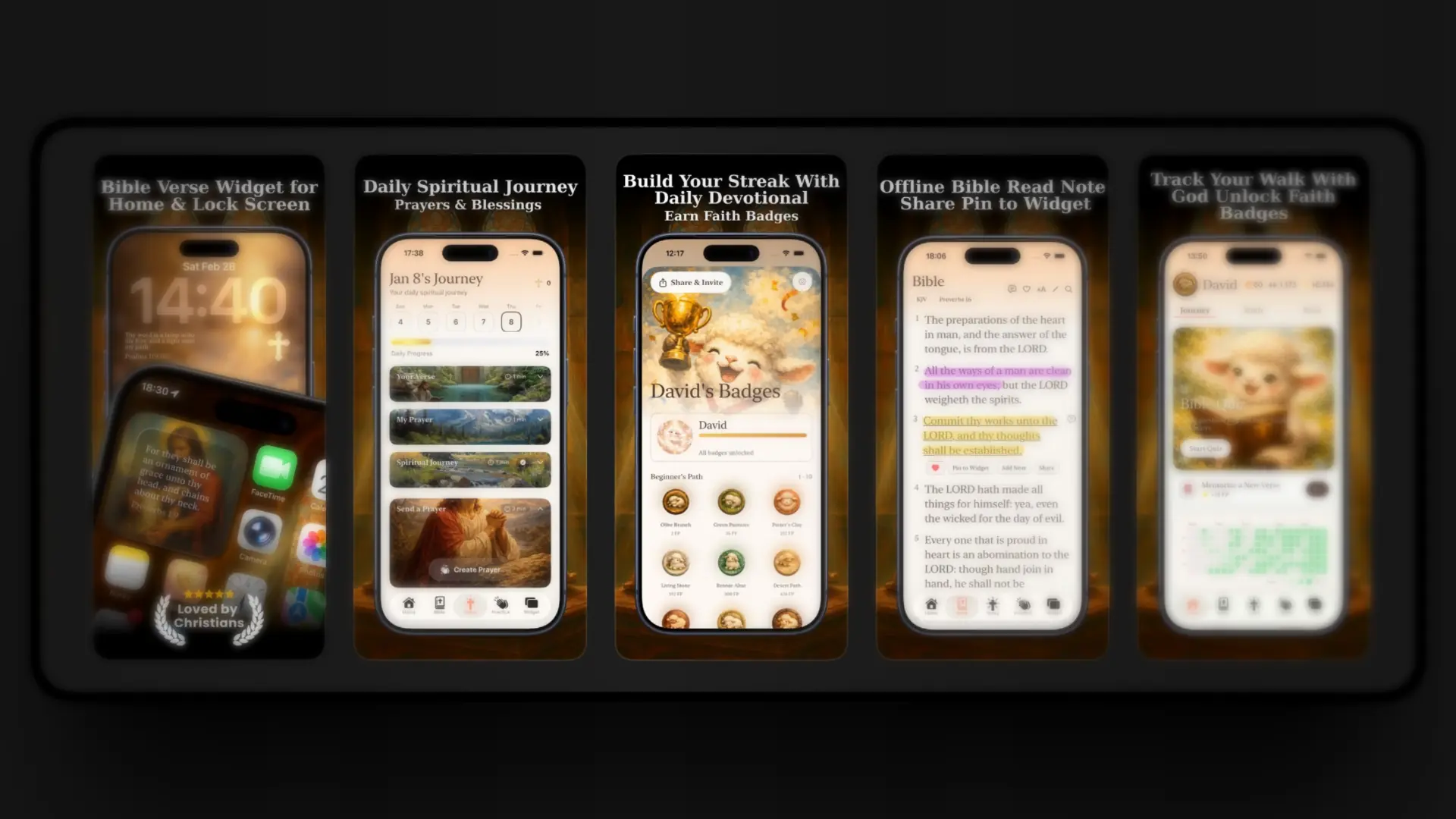
Beautiful widget previews, Heaven Mode interface, and daily verse display.
Quick Video Tutorial
Watch: Add Bible Verse Widget to Lock Screen (60 seconds)
Visual walkthrough of the setup flow.
FAQ: Bible Verse Widget on iPhone Lock Screen
How do I add Bible verse widget to iPhone lock screen?
Long press lock screen → Customize → add Bible Widget below clock.
Widget not appearing?
Open the app once after install, confirm the iPhone is on iOS 17 or later, restart if needed, then re-add.
Can I change Bible translation?
Yes – switch KJV, NIV, etc. in app settings anytime.
Does it update automatically?
Yes – new Verse of the Day daily (internet for refresh).
Download Now & Transform Your Lock Screen
Start every glance with God's Word.
Download Bible Widget Verse of the Day
More at: https://biblewidget.netlify.app
Add this today and let scripture guide your day. God bless! ✝️

Bible Widget
Verse of the Day
Loading...